
Shipping logic

Delivery rates

Use Shopify delivery rates or app-managed COD delivery rules, then preview exactly why each COD delivery option appears.

COD delivery rates command center
Use app delivery rates Create COD delivery rates in this app and show them inside the COD form.
Shopify delivery Pull Shopify shipping rates after the customer enters a delivery address.
Fallback to app rates Use app rules when Shopify does not return a matching rate.
Rate board Rules merchants actually edit
Name Charge Condition Zones
Standard delivery $180 Order >= $2,500 · Product tag: fragile · COD fee Country + region
Free delivery $0 Free delivery above $5,000 · Qty <= 6 Selected countries
Heavy cart delivery $220 Weight >= 1 kg · Vendor: COD-ready Global regions
Rule editor Every real delivery condition, grouped for scanning
Delivery rate name Delivery description Delivery rate is active All / any / at least matching Duplicate, edit, delete
Charge formulas
Fixed $180 Free $0
Geographic targeting
Countries Selected countries Provinces / states Regional rules
Cart value, weight, and quantity
Min order total Order >= $2,500 Max order total Order <= $25,000 Min weight Weight >= 1 kg Max weight Weight <= 8 kg Min quantity Qty >= 2 Max quantity Qty <= 6
Product catalog conditions
Selected products Choose store products Product tags Any matching tag Vendors Match product vendor
COD fees and thresholds
COD fee Cash collection fee Free delivery above Threshold discount
  • Rate method

    Delivery source

    Use Shopify rates, app COD rates, or fallback when Shopify has no matching rate.

    Shopify or app rates
  • COD rate builder

    Custom rate setup

    Create named COD delivery rates with free or fixed prices, COD fees, active state, and free-delivery thresholds.

    Fees and thresholds
  • Matched rules

    Rate conditions

    Show rates by country, province/state, city, district, area, order total, weight, quantity, selected products, product tags, and vendors.

    Location and cart rules
  • Test before saving

    Storefront preview

    Preview matched delivery options before saving, so merchants can see why a rate appears.

    Matched delivery choices
Checkout form

Customise COD form

Design the COD customer form and order summary so the checkout feels native to the merchant store.

  • Customer form

    Checkout layouts

    Choose compact, side-by-side, simple white, branded, or bottom-sheet COD forms.

    Five form layouts
  • Order summary

    Summary layouts

    Choose highlighted total, separate sections, product focus, simple receipt, or warm receipt summaries.

    Five summary styles
  • Live checks remain on

    Safe preview

    Preview the saved layout while risk, delivery, and OTP checks stay active.

    Preview without risk
  • Merchant styling

    Brand controls

    Tune colors, savings badges, header behavior, address layout, button colors, and post-order destination.

    Colors and destination

Storefront action

Customise COD button

Control where the COD button appears and how it looks next to product and cart checkout actions.

Product page Everyday store item

USD 120.00USD 98.00In stock

Button style preset Real buttons, not flat artwork
Custom colors
Black shadow
Warm outline
Colorful glass
Purple cart
Red raised
  • Storefront action

    Product page button

    Show a COD button below the product add-to-cart action.

    Product page COD
  • Cart action

    Cart button

    Show a COD button near cart checkout actions.

    Cart COD button
  • COD-first path

    Checkout control

    Replace or hide the normal cart checkout button when COD should be the primary path.

    Hide checkout option
  • Real button styles

    Button presets

    Pick black shadow, warm outline, colorful glass, red raised, or custom colors.

    Preset or custom

Verification rules

OTP verification: Email and WhatsApp

Require OTP only when merchant settings say the COD order needs extra confirmation.

OTP

High-value OTP

Require verification above a selected order value.

Email Template message WhatsApp Meta template
OTP message preview Your CODProof code is 123456.
OTP enabled Only appears when rules require it.
Customer verification

Confirm COD order

Demo code shown only after threshold or risk.

123456
  • Selective verification

    OTP threshold

    Set the order value that triggers verification.

    Custom order value
  • Verification channel

    Email and WhatsApp

    Send OTP by email or WhatsApp, depending on plan and provider setup.

    Email or WhatsApp OTP
  • Merchant wording

    Message copy

    Customize email OTP subject, message, and footer copy.

    Custom OTP email
  • No wasted friction

    Selective verification

    Show verification only when the order value or risk signals require it.

    Only when needed

Risk controls

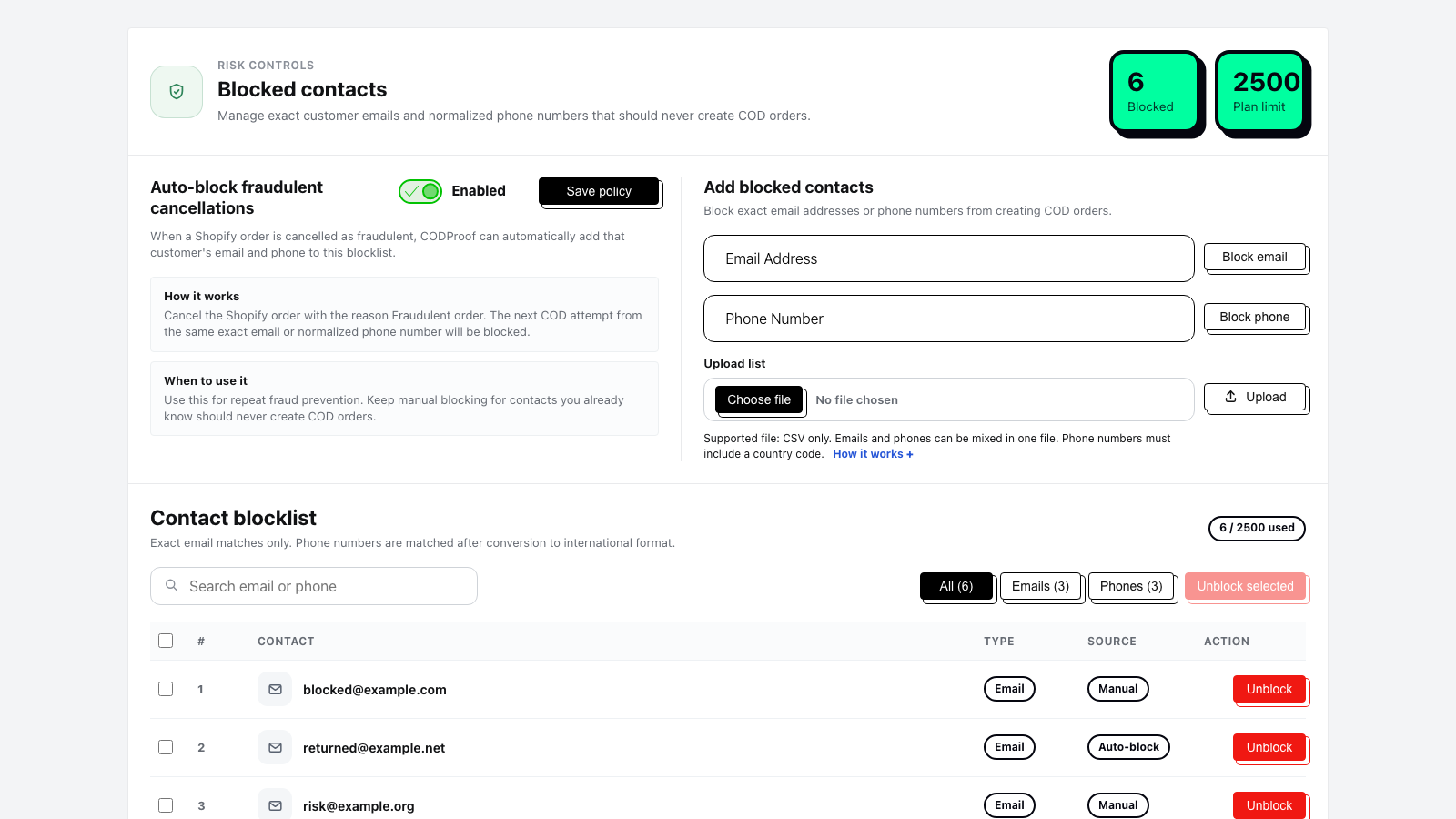
Blocked contacts: manual, auto, and bulk

Keep repeat-risk buyers from creating COD orders by managing exact email and phone blocklists.

CODProof blocked contacts screen with manual, auto-block, and bulk upload controls
  • Block exact contacts

    Manual blocking

    Block exact emails and normalized phone numbers.

    Email and phone
  • Fast cleanup

    Bulk import

    Upload mixed email and phone CSV blocklists.

    CSV blocklists
  • Repeat-risk control

    Auto block

    Block contacts from fraudulent Shopify cancellations on supported plans.

    Fraud cancellation signal
  • Clearer workflow

    Contact audit

    Search, filter, select, unblock, and review contact sources from the admin screen.

    Search and unblock

Order checks

Email and phone checks still run underneath.

CODProof also checks disposable or typo email domains, DNS/MX and mailbox signals, phone country mismatch, local mobile rules, impossible lengths, and fake placeholder patterns before order creation.

Try live demo